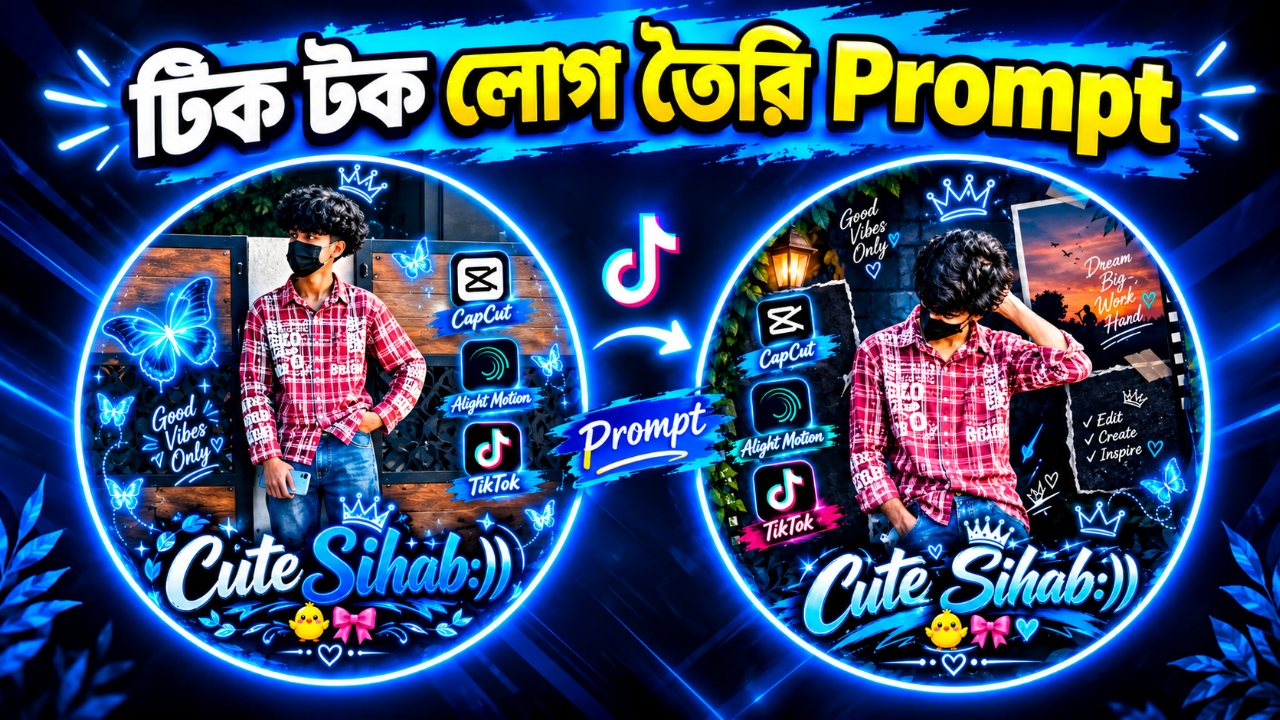
Use my uploaded photo as the main reference and create an ultra-HD, professional, stylish social media profile picture inspired by the attached reference design.

IMPORTANT: Use the uploaded person's own face and identity. Preserve their original facial features, hairstyle, skin tone, body shape, and natural appearance as accurately as possible. Do not replace the person with someone else.

1. MAIN DESIGN:
Create a large, perfectly circular profile picture with a thick, glowing electric-blue and white neon border. Use a pure black background outside the circle. The design should look premium, modern, vibrant, and eye-catching.

2. PERSON:
Place the uploaded person prominently in the center. Keep the person's original outfit and natural appearance. Create realistic lighting, sharp details, professional photography quality, and beautiful blue rim lighting. Do not make the face look artificial or cartoonish.

3. NEON DECORATIONS:
Add beautiful glowing blue butterflies, tiny stars, sparkling particles, elegant neon hearts, decorative leaves, and small crown doodles around the person. Make the decorations symmetrical and visually balanced.

4. SOCIAL MEDIA ICONS:
On the right side, add three separate stylish glowing panels containing the official recognizable icons of:
- CapCut
- Alight Motion
- TikTok

Place each icon inside a rounded-square dark panel with a bright blue neon outline. Add stylish blue brush-stroke labels beneath each icon with the correct names: "CapCut", "Alight Motion", and "TikTok".

5. LEFT-SIDE TEXT:
Write "Good Vibes Only" in beautiful handwritten white lettering with blue neon glow. Decorate it with small hearts, stars, and curved doodle lines.

6. PERSONALIZED NAME:
At the bottom of the circular design, write the following name exactly as provided:

"YOUR NAME"

Replace YOUR NAME with the name I want to display. Do not write the words "YOUR NAME" unless that is the actual requested name.

Use large, elegant, premium cursive typography. Make the first part of the name white and the remaining part electric blue, with a thick dark outline, bright blue neon glow, and subtle 3D depth. Make the name the main visual highlight of the design.

7. EXTRA DETAILS:
Add a small glowing crown above the person's head and another decorative crown near the name. Place a cute yellow chick emoji-style illustration and a pink ribbon bow below the name. Add a few glowing blue hearts and sparkles to fill empty spaces beautifully.

8. COLOR AND QUALITY:
Dominant colors: electric blue, cyan, white, and black, with small pink and yellow accents.
High contrast, ultra-sharp details, realistic photography, professional graphic design, smooth neon glow, premium editing aesthetic, 4K quality.

9. COMPOSITION:
Square 1:1 aspect ratio. Keep all important elements inside the circular border so the design works perfectly as a social media profile picture. Ensure the face and name are large, clear, and readable, even on a mobile phone.

10. TEXT ACCURACY:
Spell every word correctly. Do not add random letters, extra names, watermarks, or unwanted text. The personalized name must be exactly: YOUR NAME.

FINAL RESULT:
Create a stunning, personalized, electric-blue neon profile picture inspired by the reference image, with my own photo and my own name. Make it look professionally edited, stylish, unique, and ready to upload as a profile picture.